Setting up Jama Connect Webhooks (KOTS)
Jama Connect Webhooks is an optional feature that sends event notifications from Jama Connect to webhook endpoints configured through Jama Connect Interchange. In a Jama Connect KOTS environment, setup includes preparing the Data Stream database, enabling and deploying the Data Stream Service, and validating the deployment.
Architecture overview
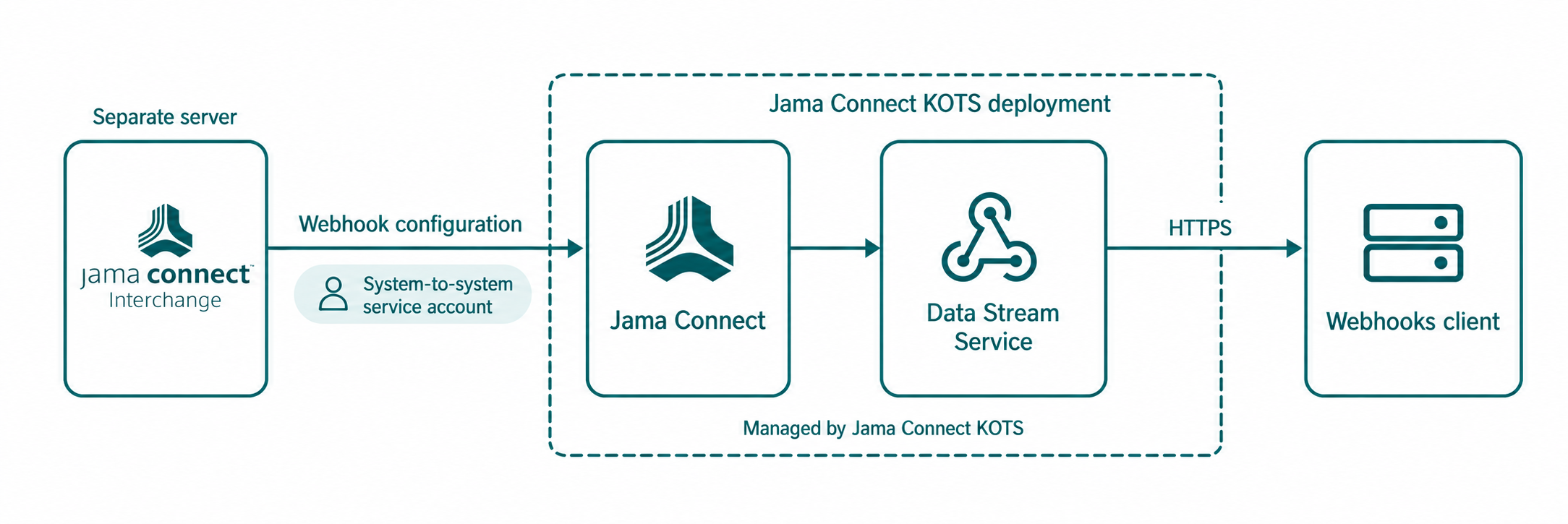
The Data Stream Service runs with Jama Connect. It isn't installed on the Jama Connect Interchange server, and enabling it doesn't change the published Jama Connect Interchange server's specifications.
Jama Connect KOTS manages the Data Stream Service deployment.
The Data Stream Service uses a separate database area for its data and encrypted webhook signing material.
Jama Connect Interchange uses a dedicated system-to-system service account to configure webhooks in Jama Connect.
For Jama Connect Interchange host requirements, see Self-hosted server specifications.
Process overview
Setting up Jama Connect Webhooks in a Jama Connect KOTS environment involves preparing a separate database, enabling and initializing the service, and completing the Jama Connect Interchange configuration.
Check the prerequisites and confirm network access.
Prepare the Data Stream database and credentials.
Enable and deploy the Data Stream Service in Jama Connect KOTS.
Validate the deployment, then finish the setup in Jama Connect Interchange.