Update the Jama Connect KOTS platform (internet)
Before you can deploy Jama Connect 9.41.x, you must first update the Jama Connect KOTS platform (referred to as an in-place upgrade).
Important considerations
Jama Connect now uses OpenSearch for indexing and search instead of Elasticsearch. To ensure a successful update process, you must remove the existing Elasticsearch StatefulSets and PVCs, and delete the existing labels from the Elasticsearch nodes. Make note of the Elasticsearch settings (they are removed as part of the update process), so you can refer to them when you update the OpenSearch settings. Instructions for completing these steps are included in this task.
After upgrading to Jama Connect 9.41.x, you must perform a reindex.
Expect downtime. Upgrade during off hours to minimize the impact.
The Kubernetes (kURL) installer is interactive and prompts you to confirm some of the steps. Depending on the number of remote nodes in your environment, expect this part of the upgrade process to take at least two hours.
If you have dedicated Elasticsearch nodes, you are prompted to run separate installer commands on the secondary nodes during the installation.
Run the install commands inside a terminal multiplexer session to keep the session active in the event that the connection is dropped or the terminal is closed.
To update the Jama Connect KOTS platform:
Back up your Jama Connect instance.
Delete all Elasticsearch StatefulSets and PersistentVolumeClaims on all nodes:
kubectl delete sts elasticsearch
kubectl delete pvc volume-elasticsearch-0
kubectl label node <node-name> jamasoftware.net/service=opensearch
Run the kURL installer:
Important
The kURL installer is interactive and prompts you to continue several times throughout the upgrade process. Kubernetes is upgraded incrementally in steps from version 1.31 and requires you to confirm several of the steps before proceeding to the next version.
From the command line on the primary node/application server, enter the following command to initiate the installation:
curl -sSL https://kurl.sh/jama-k8s-standardkots | sudo bash -s
Note
kURL bundles and installs host packages without relying on external package repositories, except for on Red Hat Enterprise Linux 9 and Ubuntu 24. If kURL is unable to install a required host package, the output notifies you. It this occurs, manually install the missing package and then re-run the kURL installer to proceed.
Prepare your instance for the new Jama Connect release. This command deletes targeted KOTS resources, which is required before deploying the new version of Jama Connect.
kubectl delete sts/activemq sts/core sts/diff sts/elasticsearch \
sts/hazelcast sts/oauth sts/saml deployment/oauth deployment/saml \
sts/search sts/nginx sts/core-ingress sts/core-reports sts/core-jobs \
jobs/tenant-manager pvc/volume-oauth-0 pvc/volume-saml-0
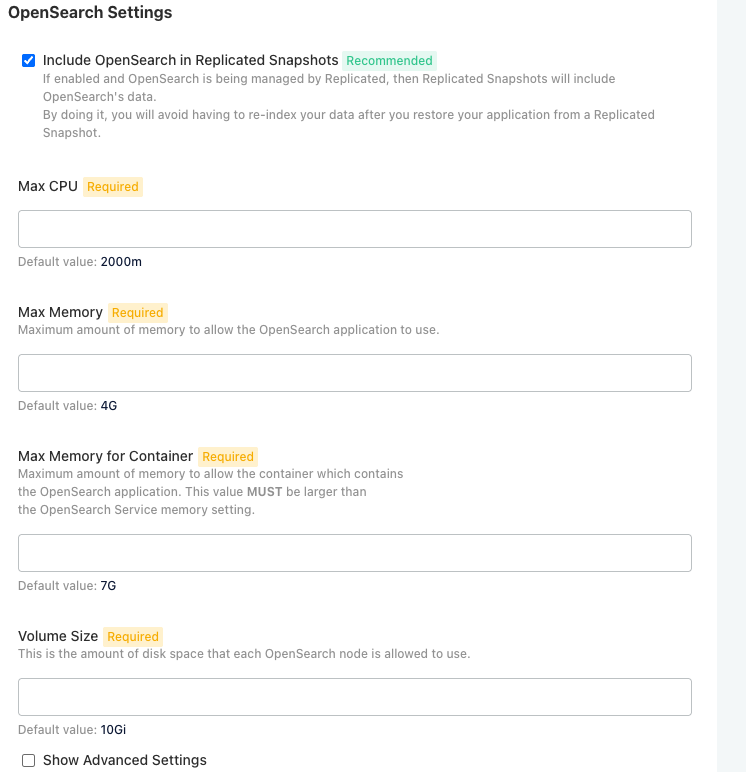
In the KOTS Admin Console, scroll to OpenSearch Settings and enter the new OpenSearch configuration settings.
Tip
Refer to the Elasticsearch settings you recorded earlier in this task.
Label the new OpenSearch nodes:
kubectl label nodes <node-name> jamasoftware.net/service=opensearch
Once you've updated the Jama Connect platform, you can upgrade the application.