Example branching use cases
Branching lets you isolate a stable set of requirements or changes while development continues in the main branch. Use a branch when teams need to test, review, support, or release work without disrupting ongoing development.
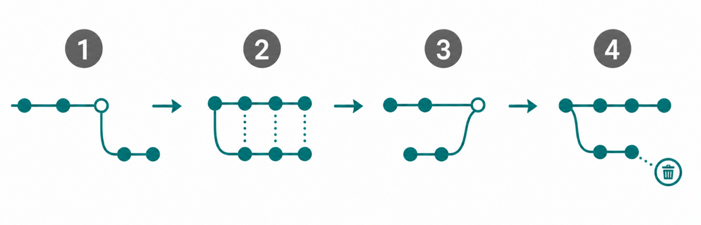
Workflow
The following use case examples show how teams can apply branching to different types of work. Each scenario follows the same basic model:
Isolate work in a branch.
Compare changes with the main branch.
Merge approved changes when appropriate.
Delete the branch when it is no longer needed (optional).
The following examples represent common branching workflows. Your team can apply the same branching capabilities to other scenarios that require isolated work and controlled merging.
The example workflows use a combination of the following capabilities:
Branch Create
Branch Comparison (Diff View)
Branch Merge
Branch Delete
The capabilities available in each workflow depend on the type of work you need to isolate and how you manage approved changes.
See the following use cases: