Configure dedicated OpenSearch nodes (KOTS)
Your primary KOTS server (node) is referred to as a KOTS stack. To run OpenSearch, you must add one or more secondary nodes where OpenSearch will run, and configure the nodes to run OpenSearch.
Important considerations
This task is optional .
You must have a functioning primary KOTS server and a secondary server where Replicated KOTS has not yet been installed. For secondary node specifications, see Application server requirements.
This task is appropriate for a new node and an existing node.
Contact Support to enable remote OpenSearch for your Replicated license.
To configure your nodes:
Make sure communication is established between primary (KOTS stack) and secondary (where OpenSearch will run) KOTS nodes. For more information, see Prepare your application server.
On the secondary node, configure the memory settings for OpenSearch.
echo "vm.max_map_count=262144" | sudo tee -a /etc/sysctl.conf
sudo sysctl -p
On the Admin Console of the primary node below Version history, select Check for updates to synch the changes made to your license.
Select the Config tab and, if you see the following message, select Edit the latest config.

Scroll down to the OpenSearch Settings section and follow the steps shown to add a dedicated OpenSearch node.
Set the number of OpenSearch nodes to match the number of dedicated KOTS nodes that you configured.
Adjust the maximum memory and CPU that each OpenSearch node can use based on the specifications of each dedicated KOTS node set up for OpenSearch. For more information, see Application server requirements and Resource sizing for application server.
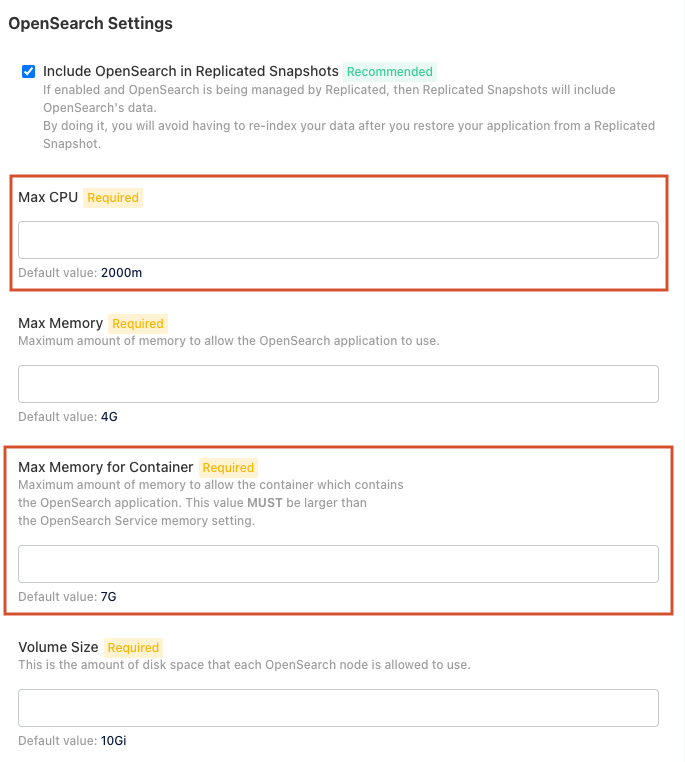
Select Save config.
Deploy the changes.
When the OpenSearch cluster is up and running, reindex all items.
The secondary nodes are now configured to be able to run OpenSearch.