Validate Assistant workflows
A model that answers a chat question might still fail Jama Connect tool calls or structured workflows. Validate each layer to locate connectivity, adapter, provider, model, or workflow failures.
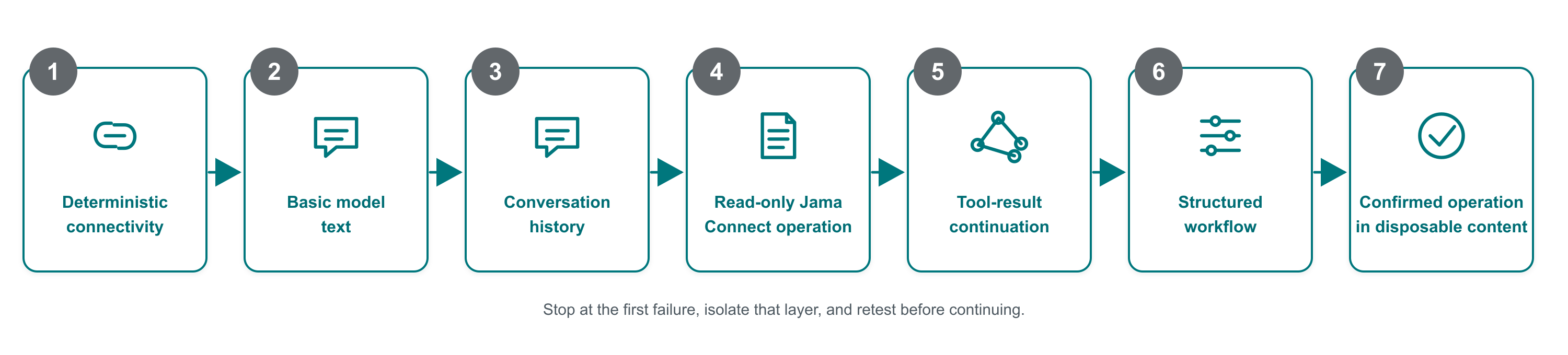
Passing one level doesn't validate later levels.
1. Validate connectivity without a provider
Use the deterministic adapter supplied in the version-matched starter kit. It validates the Jama Intelligence Gateway request and returns a fixed valid response without calling a model.
This test proves:
Jama Connect can reach the configured operation URL.
DNS, routing, TLS, port, and operation path are usable.
The basic Jama Intelligence Gateway adapter request and response exchange succeeds.
If this test fails, resolve the Jama Connect-to-adapter connection before testing a provider.
2. Validate basic model text
Configure the provider-backed adapter and send a harmless natural-language request.
Confirm that:
The adapter accepts the Jama Intelligence Gateway request.
The provider invocation succeeds.
The adapter returns valid assistant text.
Jama Connect displays the response.
3. Validate conversation history
Ask a follow-up question that depends on the prior response. Confirm that the adapter preserves ordered conversation history and that the model answers in context.
4. Validate a read-only Jama Connect operation
Use known non-sensitive test content. Ask Assistant to retrieve or summarize one identified Jama Connect item.
Confirm that:
The model selects the appropriate supplied Jama Connect tool.
The arguments match the supplied tool schema.
Jama Connect authorizes and executes the read-only operation.
The model uses the returned Jama Connect evidence in its final response.
5. Validate tool-result continuation
Confirm that the adapter preserves the tool-call identifier and tool name when Jama Connect sends the result back to the model. The model must continue from the result and return a final response.
6. Validate structured workflows
Test the workflows your organization intends to use, including structured planning, forced-tool selection, and multi-step responses. Validate the complete workflow through Jama Connect rather than relying only on a direct provider test.
7. Validate a confirmed operation
Use disposable test content and a user with the intended permissions. Ask Assistant to perform a supported operation that requires confirmation.
Confirm that:
Jama Connect presents the proposed action for review.
The user can approve or reject it.
Jama Connect executes only the approved action.
The resulting Jama Connect content matches the confirmed request.
Validate error handling
Confirm that the adapter returns safe, meaningful errors for:
Invalid or unsupported request versions.
Malformed requests.
Wrong operation paths.
Endpoint access rejection.
Provider throttling.
Provider or adapter failures.
Malformed successful responses.
Repeat this validation after changing the adapter, provider API version, model family, model deployment, or relevant inference configuration.
Result
Your production candidate completes the Jama Connect workflows you plan to use and returns useful errors without exposing secrets or unnecessary customer content.