Initiate a review from a previous baseline
You can compare a reviewed baseline with the latest item version to see how items changed between revisions. Each review revision has its own baseline.
This type of review provides a separate view of changes across item versions, making it easy to identify what changed between versions.
Important considerations
When you open the review in Comparison View, it uses the selected baseline. The baseline version comparison drop-down menu is disabled until the review has newly published revisions available for comparison. Until then, you can compare current items only with the original baseline.
To initiate a review from a previous baseline:
Use one of these methods to initiate a review from a previous baseline:
From a baseline, select Send for review.
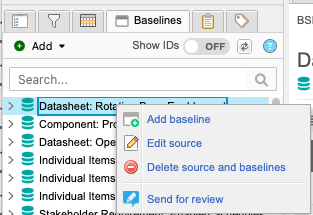
From the baseline content header, select Send for review.

Follow the prompts in the review wizard to define and initiate your review.
Definition — Name your review, set a deadline, and select the items to be reviewed.
Settings — Configure the settings for your review.
Participants — Select the group you want to include as review participants.
Invitation — Complete and send the invitation email.
The review opens in comparison view and the changes are displayed inline. Deleted text is red and highlighted; added text is green and underlined.
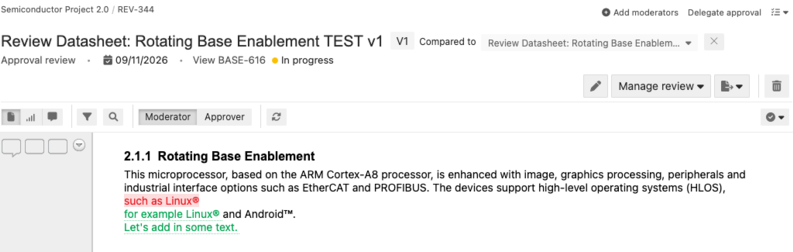
Select Publish new revision to enable the baseline version comparison drop-down menu, then select a new version to compare with the baseline.
